Learning Objectives
After completing this lesson, you’ll be able to:
- Define the key components of FME Flow.
- Define the engines workflow for processing jobs.
- Differentiate between the different types of engines.
Instructions
In this lesson, you will:
- Optional: Watch a demonstration video (if you have not attended the live training).
- Scroll down to read the lesson.
- Complete the quiz at the end of this lesson.
- Click 'Next' to mark the lesson complete.
Learning Objectives
After completing this lesson, you’ll be able to:
- Define the key components of FME Flow.
- Define the engines workflow for processing jobs.
- Differentiate between the different types of engines.
Instructions
In this lesson, you will:
- Optional: Watch a demonstration video (if you have not attended the live training).
- Scroll down to read the lesson.
- Complete the quiz at the end of this lesson.
- Click 'Next' to mark the lesson complete.
FME Flow Components
FME Flow consists of several different components that work together to make it function. While it's unnecessary to have a deep understanding of the full architecture to deploy workflows on FME Flow, you will likely find it easier to maximize FME Flow functionality and troubleshoot workflows with some background knowledge.

If you are interested in administering FME Flow, the Getting Started with FME Flow Administration tutorial takes a deep dive into the architecture of FME Flow. You can choose from flexible deployment options tailored to your organization’s needs, including both on-premises and cloud options.
Each FME Flow instance includes:
- Web Application Server: runs the web user interface and web services.
- Core: manages job requests, scheduling, and repository contents.
- Engines: run FME workspaces as job requests.
- Database and FME Flow System Share: stores all information related to FME Flow.
FME Flow requires all these components to function; however, you can deploy them across different systems or in the cloud as needed.
Web Application Server
The FME Flow web application server runs the FME Flow web user interface, FME Flow web services, and any other web clients. You access and interact with the web user interface through a web browser. The FME Flow web services enable you to run data integration workflows as web-accessible endpoints. FME Flow has several web services:
FME Flow Core
The FME Flow core manages job requests, scheduling, and repository contents.
When submitting jobs to engines to run, the FME Flow core controls how jobs run through transformation services, assigns them to the correct queue, and communicates their job expiry times.
To do this, the FME Flow core manages:
- FME workspaces
- Job results
- Schedules
- Notifications
- Automations
- Repository contents (workspaces, custom formats, custom transformers, data)
- WebSocket server
- Licensing
- Engine queue
The FME Flow core contains a Software Load Balancer (SLB) that distributes jobs to FME engines.
FME Flow Engines
FME engines process and run FME workspaces. Each FME engine processes a single request to run a workspace at a time, called a job. The FME Flow core manages job requests and submits them to the engines to run the workspaces. FME Flow engines are identical to the engine that powers FME Workbench. Each installation of FME Workbench includes one engine for job processing, while an FME Flow installation can possess multiple engines, allowing you to scale your FME Flow to meet all your needs.
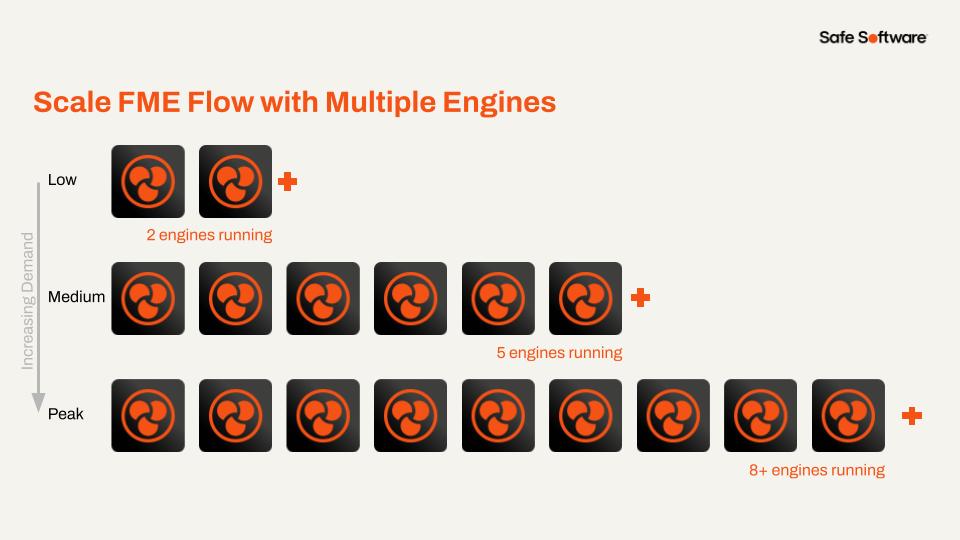
If an engine is unavailable, meaning all engines are busy running other workspaces, FME Flow will queue the job and wait for an engine to become available before processing the workspace. You can scale FME Flow job processing by connecting additional FME Engines to the Flow Core. These FME engines can run on the same machine as the Core, on separate servers within a distributed FME Flow environment, or as remote engines closer to your data. FME engines are flexible to deploy wherever your data lives.
There are two types of engine licenses:
- Standard Engines: You purchase fixed licenses individually per engine. Each standard engine remains available and active throughout the license period.
- Dynamic Engines (CPU Usage): Engines licensed based on actual CPU processing time, measured in credits. Each credit corresponds to one hour of active engine CPU usage when the engine is actively processing jobs, allowing you to scale resources as needed efficiently.
Dynamic engines complement standard engines and help in scenarios involving:
- Variable or unpredictable workload spikes (busy workloads).
- Managing queued jobs by offloading excess demands from standard engines.
For more information on dynamic engines, read our article on Getting Started with Dynamic Engines.
FME Flow Database
The FME Flow core uses a database to store all fundamental information related to FME Flow. FME Flow stores records including jobs, repositories, automations, users, and more. By default, FME Flow uses a PostgreSQL database server. However, you can configure it to use an Oracle or SQL Server database in distributed or fault-tolerant environments.
The FME Flow database is an internal application database that you should not use for direct access or for storing source or destination data.
To learn more about the various database options for FME Flow, please see Provide a Database Server.
FME Flow System Share
Although it's not a running service, the FME Flow system share is a file storage location for user-accessible data and resources. The system share stores workspaces, source data, log files, and other essential FME Flow data, such as encryption keys and licenses.
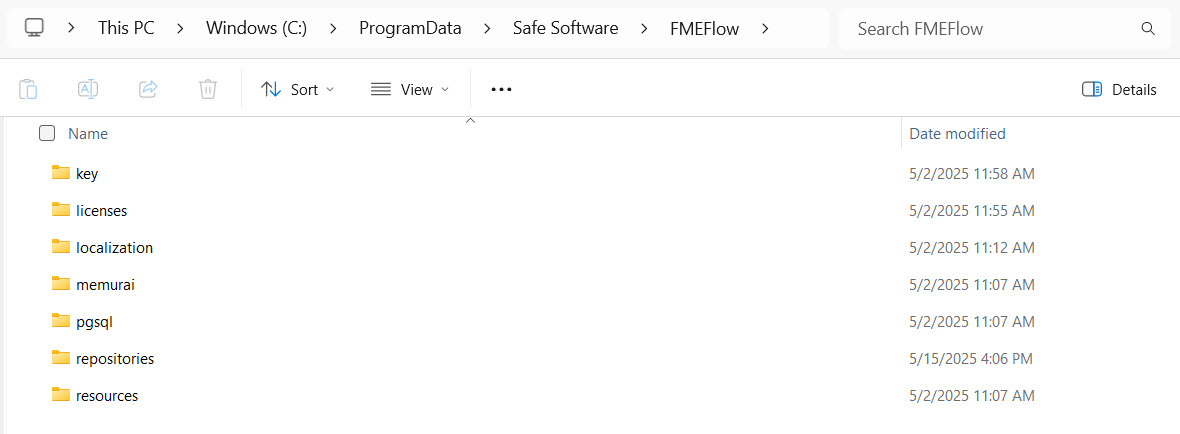
By default, FME Flow installs the system share in C:\ProgramData\Safe Software\FMEFlow on Windows. When you install FME Flow as a distributed environment, you may install the system share in directories on a remote file system to enable access from different computers.
All these systems and services work together to run FME Flow. With express installations, you will find all these services on the same machine or server. In distributed and fault-tolerant environments, you may host these services on different servers. It's vital to have all these systems running and connected, otherwise FME Flow will behave poorly and you'll encounter numerous errors.
This course does not cover express, fault-tolerant, and distributed deployment options. For more information, see our documentation on Choosing a Deployment Architecture.
FME Flow Components
FME Flow consists of several different components that work together to make it function. While it's unnecessary to have a deep understanding of the full architecture to deploy workflows on FME Flow, you will likely find it easier to maximize FME Flow functionality and troubleshoot workflows with some background knowledge.
If you are interested in administering FME Flow, the Getting Started with FME Flow Administration tutorial takes a deep dive into the architecture of FME Flow. You can choose from flexible deployment options tailored to your organization’s needs, including both on-premises and cloud options.
Each FME Flow instance includes:
- Web Application Server: runs the web user interface and web services.
- Core: manages job requests, scheduling, and repository contents.
- Engines: run FME workspaces as job requests.
- Database and FME Flow System Share: stores all information related to FME Flow.
FME Flow requires all these components to function; however, you can deploy them across different systems or in the cloud as needed.
Web Application Server
The FME Flow web application server runs the FME Flow web user interface, FME Flow web services, and any other web clients. You access and interact with the web user interface through a web browser. The FME Flow web services enable you to run data integration workflows as web-accessible endpoints. FME Flow has several web services:
FME Flow Core
The FME Flow core manages job requests, scheduling, and repository contents.
When submitting jobs to engines to run, the FME Flow core controls how jobs run through transformation services, assigns them to the correct queue, and communicates their job expiry times.
To do this, the FME Flow core manages:
- FME workspaces
- Job results
- Schedules
- Notifications
- Automations
- Repository contents (workspaces, custom formats, custom transformers, data)
- WebSocket server
- Licensing
- Engine queue
The FME Flow core contains a Software Load Balancer (SLB) that distributes jobs to FME engines.
FME Flow Engines
FME engines process and run FME workspaces. Each FME engine processes a single request to run a workspace at a time, called a job. The FME Flow core manages job requests and submits them to the engines to run the workspaces. FME Flow engines are identical to the engine that powers FME Workbench. Each installation of FME Workbench includes one engine for job processing, while an FME Flow installation can possess multiple engines, allowing you to scale your FME Flow to meet all your needs.
If an engine is unavailable, meaning all engines are busy running other workspaces, FME Flow will queue the job and wait for an engine to become available before processing the workspace. You can scale FME Flow job processing by connecting additional FME Engines to the Flow Core. These FME engines can run on the same machine as the Core, on separate servers within a distributed FME Flow environment, or as remote engines closer to your data. FME engines are flexible to deploy wherever your data lives.
There are two types of engine licenses:
- Standard Engines: You purchase fixed licenses individually per engine. Each standard engine remains available and active throughout the license period.
- Dynamic Engines (CPU Usage): Engines licensed based on actual CPU processing time, measured in credits. Each credit corresponds to one hour of active engine CPU usage when the engine is actively processing jobs, allowing you to scale resources as needed efficiently.
Dynamic engines complement standard engines and help in scenarios involving:
- Variable or unpredictable workload spikes (busy workloads).
- Managing queued jobs by offloading excess demands from standard engines.
For more information on dynamic engines, read our article on Getting Started with Dynamic Engines.
FME Flow Database
The FME Flow core uses a database to store all fundamental information related to FME Flow. FME Flow stores records including jobs, repositories, automations, users, and more. By default, FME Flow uses a PostgreSQL database server. However, you can configure it to use an Oracle or SQL Server database in distributed or fault-tolerant environments.
The FME Flow database is an internal application database that you should not use for direct access or for storing source or destination data.
To learn more about the various database options for FME Flow, please see Provide a Database Server.
FME Flow System Share
Although it's not a running service, the FME Flow system share is a file storage location for user-accessible data and resources. The system share stores workspaces, source data, log files, and other essential FME Flow data, such as encryption keys and licenses.
By default, FME Flow installs the system share in C:\ProgramData\Safe Software\FMEFlow on Windows. When you install FME Flow as a distributed environment, you may install the system share in directories on a remote file system to enable access from different computers.
All these systems and services work together to run FME Flow. With express installations, you will find all these services on the same machine or server. In distributed and fault-tolerant environments, you may host these services on different servers. It's vital to have all these systems running and connected, otherwise FME Flow will behave poorly and you'll encounter numerous errors.
This course does not cover express, fault-tolerant, and distributed deployment options. For more information, see our documentation on Choosing a Deployment Architecture.